
Focusrite FAST Limiter
Description
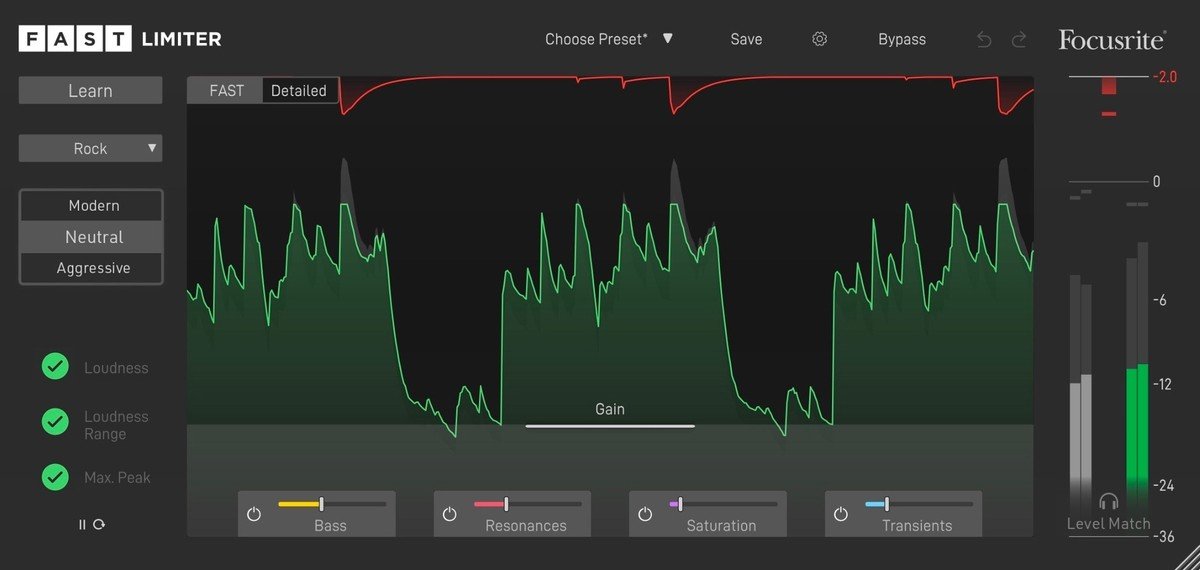
The FAST Limiter is a cutting-edge artificial intelligence plugin designed specifically for Mac users, helping you take your music tracks across the finish line and enhancing your music production process. With the intuitive FAST View, you’re instantly given the best possible sound quality, as the AI intelligently handles granular adjustments and sets parameters tailored specifically to the unique characteristics of your track. Maintain your creative flow and instantly alter the impact of the Focusrite FAST Limiter plugin on your audio with a simple choice between three unique modes: Modern, Neutral, or Aggressive. If capturing the sonic vibe of your favorite artists is your goal, use reference mastering to replicate these qualities, then fine-tune your sound further in the detailed view to perfectly adapt the result to your own music.
Easily find the ideal loudness balance so your tracks are ready for streaming on Spotify, Apple Music, and all other major streaming platforms. Watch as the Focusrite FAST Limiter mac plugin sculpts your sound using its unique, intuitive visualizer, which dynamically responds in real-time to changes you make. Constantly monitoring both the loudness and dynamic range, the quality indicator will always keep you informed as to whether your music is within optimal recommended limits or exceeding them. This allows you to make swift, well-informed mastering decisions, leveraging the best of modern AI.
Take advantage of the powerful intelligence under the hood to create a solid foundation for your tracks. Access settings such as Gain, Limit, and Speed, making it easy to instantly dial in the perfect limiter and final output level. The detailed view gives you access to every control the FAST Limiter offers, including adjustments for Bass, Resonances, Saturation, and Transients, letting you shape your sound with precision, all while staying in your creative zone and preparing your music for release.
The learning function represents the start of your sound-shaping journey. The advanced AI behind Focusrite FAST Limiter download has been trained on tens of thousands of tracks spanning acoustic, rock, pop, electronic, hip-hop, and more. By using the knowledge built into the plugin, FAST Limiter analyzes your audio in depth and applies the optimal configurations, ensuring your tracks sound as professionally finished as the top in your genre. With Focusrite FAST Limiter, producing professional-grade music on Mac is more attainable than ever.
Frequently Asked Questions
You May Also Like
Reviews & Comments
No comments yet. Be the first to share your thoughts!