Homegrown Sounds Kit Creator
Description
Transform your Mac sample collection into sampler kits for your music production workflow! Homegrown Sounds Kit Creator is the ultimate solution for Mac users, specifically designed to automatically assemble 16-sample kits compatible with MPC, Ableton Live, Speedrum, and TAL-Drum. Simply drag and drop up to 16 sample-containing folders, assign them to the pads you want, and watch as Homegrown Sounds Kit Creator Mac handles randomization. When multiple folders are linked to a pad, one folder is randomly chosen, bringing true variety to your kits. Taking randomization further, not only are your samples selected at random, but you can also set definable minimum and maximum values for parameters such as Volume, Pan, and Release Time—ensuring each kit is completely unique.
FEATURES
SOURCE – Add up to 16 recursively scanned sample folders by simple drag-and-drop. Each folder can be linked to any pad, giving flexibility in kit construction.
TEMPLATES – Integrate unlimited existing presets as templates for each sampler format. This enables you to craft complex presets as a foundational base, complete with effect assignments and other setup details. The kit will then update only those samples and parameters that are supported by Homegrown Sounds Kit Creator. Choose to use a single template, cycle through all available templates, or select templates randomly.
FOLDER ASSIGNMENT – Easily drag and drop folders and have them recursively scanned for samples. Two unique assignment views are provided: the PADS panel allows you to click on any pad and select its associated folders, while the FOLDERS panel displays a matrix for a comprehensive overview of all folder-to-pad assignments at once.
PARAMETERS – This section lets you set minimum and maximum value ranges for any parameters you wish to randomize for each pad.
PRESETS – Save the overall state of your Homegrown Sounds Kit Creator setup into a preset, allowing you to reload distinct profiles for different musical projects.
THEMING – A full theming system that supports up to 24 user-definable colors, each of which can be saved as a custom theme. Several professionally designed themes are included.
PROCESSING – On this panel, you access all export settings and trigger the preset creation process.
CREATE – Instantly generate brand-new presets in every selected format based on your chosen settings.
EDIT – Edit and randomize specific parameters within your existing presets to breathe new life into your favorite kits.
RANDOM NAME GENERATOR – With a 30,000-word database, you can generate imaginative random names for your kits. For extra convenience and organization, three-digit numeric names can also be created individually or combined with text names.
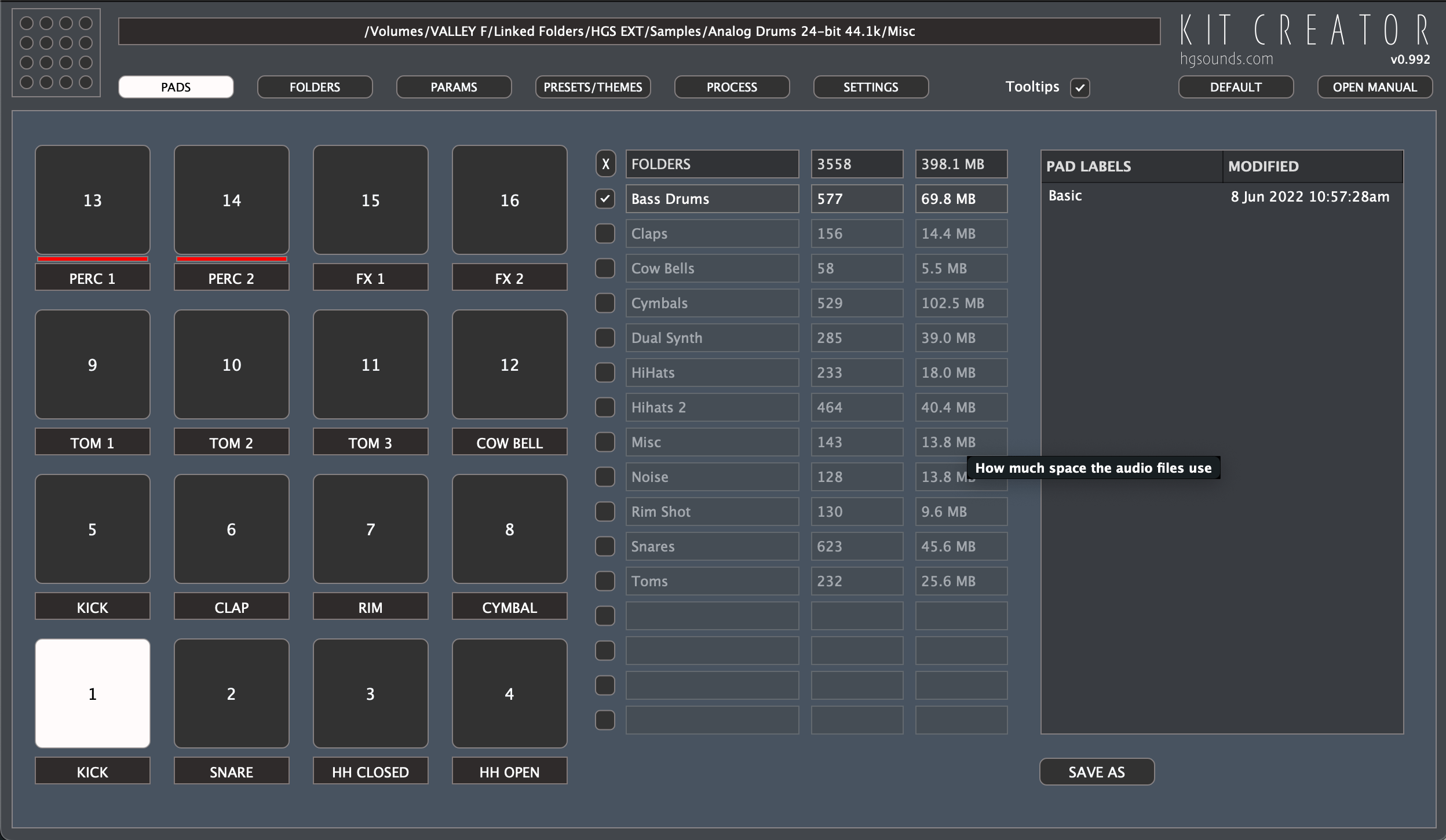
PADS PANEL
This interactive section allows you to drag sample folders directly to pads, click any pad, and check the folders you want associated with it. Hovering over a folder highlights all pads to which it’s been assigned, helping you visualize your kit structure.
PARAMETERS PANEL
Here, you can specify minimum and maximum ranges for parameters to be affected by the randomizer during preset creation, allowing for precise and creative variation in each new kit.
PROCESSING PANEL
After adding and assigning your sample folders, select your desired export formats and press “Start”—Homegrown Sounds Kit Creator Mac will automatically build and export your custom kits and presets for use in your Mac-based music software.
Frequently Asked Questions
You May Also Like
Reviews & Comments
No comments yet. Be the first to share your thoughts!